
Step 1: Locating the controller and battery
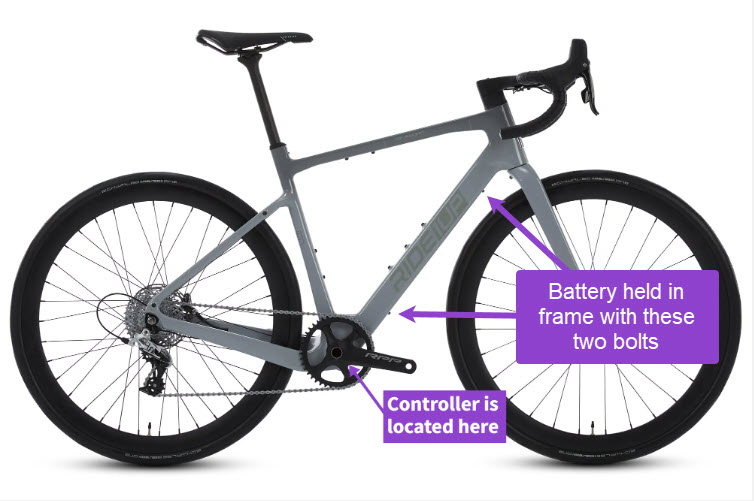
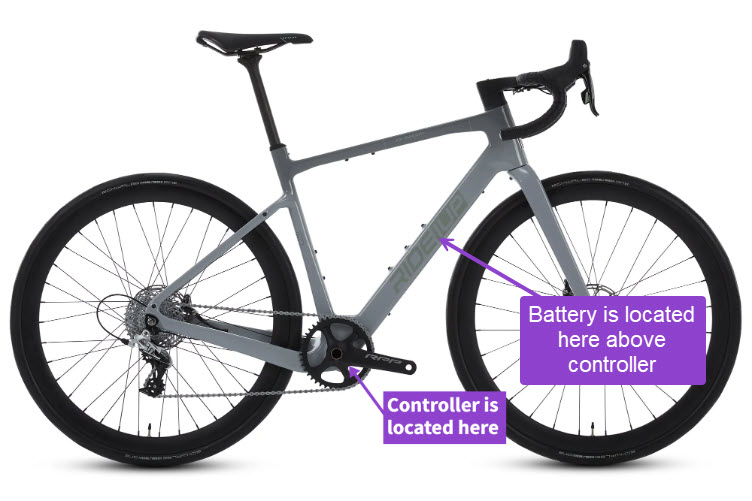
The controller on all CF Racer1 models is located at the bottom of the downtube under the access panel near the bottom bracket. The battery is located inside the downtube of the frame above the battery and is accessed through the same panel.
CF Racer1 component loacation
Step 2: Remove the access panel
To gain access to the controller one has to remove the access panel on the bottom of the bike which is held in via one. After this is removed it will lift off. If the bike is flipped over to access this door; it is important to not rest the bike on the display.
Remove the access panel

Step 3: Remove the crankset
The crankset and the bearing cover need to be removed to fully access the controller and connections. The following photos go over how to remove the crankset. The process is identical to the process of removing a Shimano Hollowtech 2 crankset. Please pay attention to all the spacers on the crankset to avoid losing them. Also take note of the spacers order and orientation as this will be important for reinstallation.
Loosen pinch bolts

Remove the crankset

Step 4: Remove Bearing Shield
Once the crankset is removed the bearing shield can be removed. This piece serves to keep the cables away from the spinning crank spindle/ bearings. The shield is spring-loaded and once compressed can be removed from the bicycle. The following video shows how this piece works. The shield can be retracted by pulling on the bolt and once the shield is compressed, tighten the bolt to hold it in that position. The installation is the opposite.
Step 5: Working on the controller
Once the panel, shield, and crank are removed; the controller is easily accessible. The controller is held in place by one of the three bolts on the downtube which is shown it the image below. While they may vary slightly the following tips are true for all controllers:
- Each connector is unique for each part. For example, a display unit cannot be plugged into where the motor cable would go.
- Pay attention to how the controller was originally sitting in the bike. The cables come out one end of the controller and for ease of reassembly, it is often best to put it back in the same configuration.
- When changing out a whole controller it is best to move the connections over one at a time until complete.
- Mark the new controller with tape or marker before starting. That way there are mix-ups during the switch.

Controller connections
Step 6: Removing the battery
At this point the only thing holding the battery in the frame is the last two bolts on the underside of the downtube and the yellow electrical connection for the charge port. The charge port can be disconnected from inside the frame and the two bolts can be removed to free the battery.
Battery removal