

The Vorsa, Portola, Revv1, 700 Series, Cafe Cruiser, Turris, and Rift, all have brake cut-off sensors in the brake levers that will cut power to the motor whenever the levers are pulled. Issues with these sensors can cause the bike to not send power to the motor with pedal assist and throttle or even throw a brake sensor error code (Error 25 on most models). The brake sensors can be a good thing to check if you are experiencing these issues with your bike and luckily they are very easy to test and adjust. In this article, we will go over how to test the brake sensors, troubleshoot an error 25 code, and adjusting the brake sensor.
This is a great place to start if you are experiencing any of the following issues with your bike.
- The display turns on but there is no power to the wheel when using the throttle and pedal assist.
- A brake sensor error code is shown on your display (error 25 on most models).
- The power to the motor intermittently cuts out while riding the bike with the pedal assist and throttle but the display stays on.
TABLE OF CONTENTS
- Pre-checks
- Brake sensor test
- Vorsa sensor connection
- Revv1 sensor connection
- Portola sensor connection
- 700 Series and Cafe Cruiser sensor connection
- Turris sensor connection
- Rift sensor connection
- Adjusting the sensor
Pre-checks
The brake sensors do sometimes need to be checked and adjusted over time due to changes from wear, vibrations, and maintenance but there are other more simple explanations that could be causing this issue. A full list of potential causes for this type of issue are:
- Holding either brake lever while the bike is powering up.
- A damaged brake lever.
- A brake lever that needs service or does not return to the resting position.
- Brake caliper service needed such as replacing brake pads or bleeding.
- The brake sensor needs adjusting.
- The brake sensor needs replacing.
- Some other electrical fault.
Due to this, we would recommend first inspecting your brakes for any potential signs of damage and performing any needed maintenance before looking closer at the sensors. Routine maintenance could be all that is needed to get you back on the road safely. Here are some resources that could help with this.
Brake sensor test
Testing the brake sensors on our bikes is actually a pretty easy process. These sensors are built into the brakes as a safety feature that ensures the bike will slow down when you pull the brakes, but they are actually not essential to the basic function of the bike. This means that we can simply unplug the sensors from the bike to determine if they are causing the issue you are experiencing. We can systematically unplug the sensors by following the steps below to determine which specific sensor is causing the issue:
- First, let's make sure the brake lever is returned to the neutral position (all the way forward) and power the bike off and on. Pull back the brake lever and let it spring forward a few times. (Do not ease the lever forward. let it go as fast and hard as it will on its own)
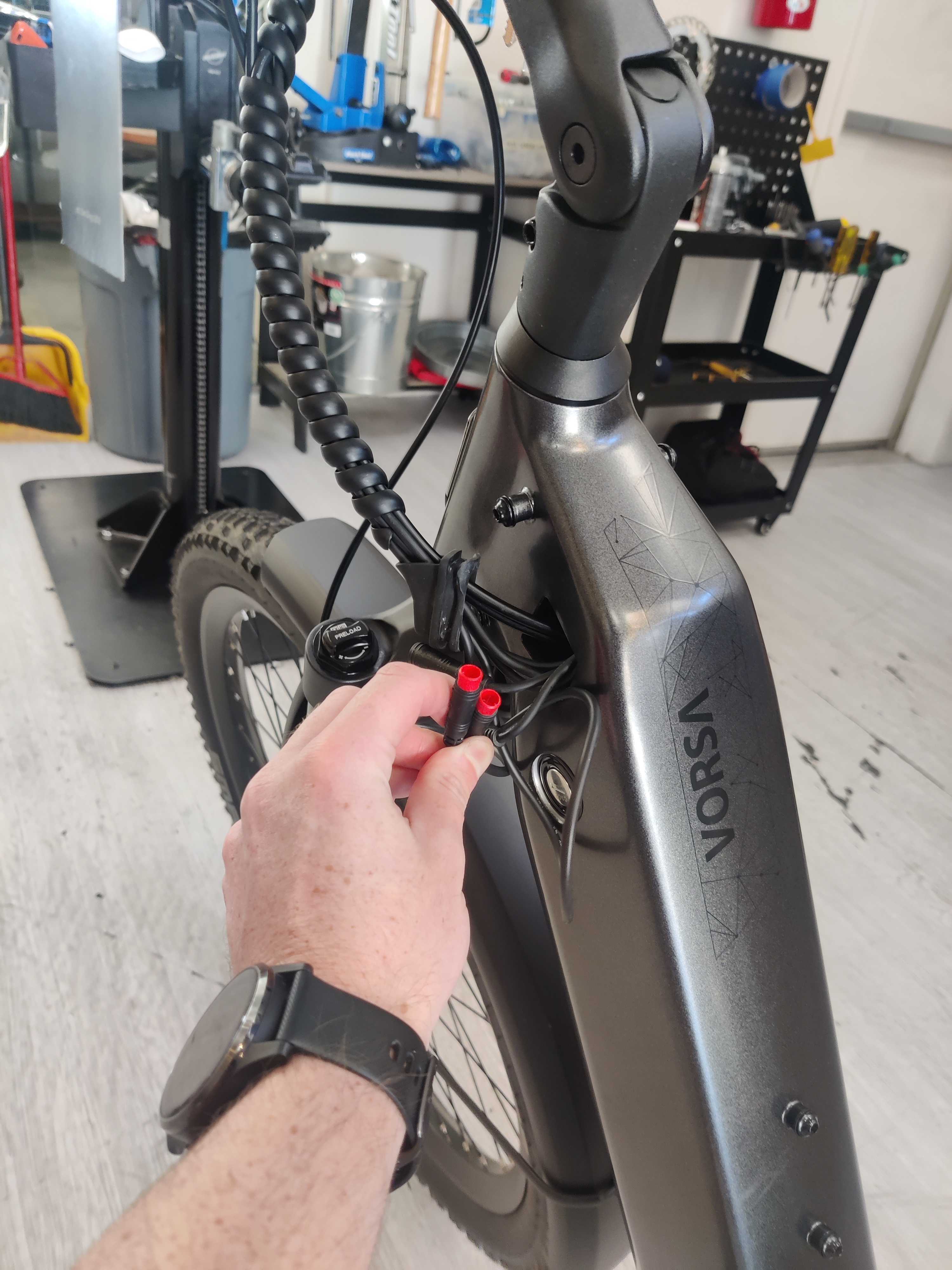
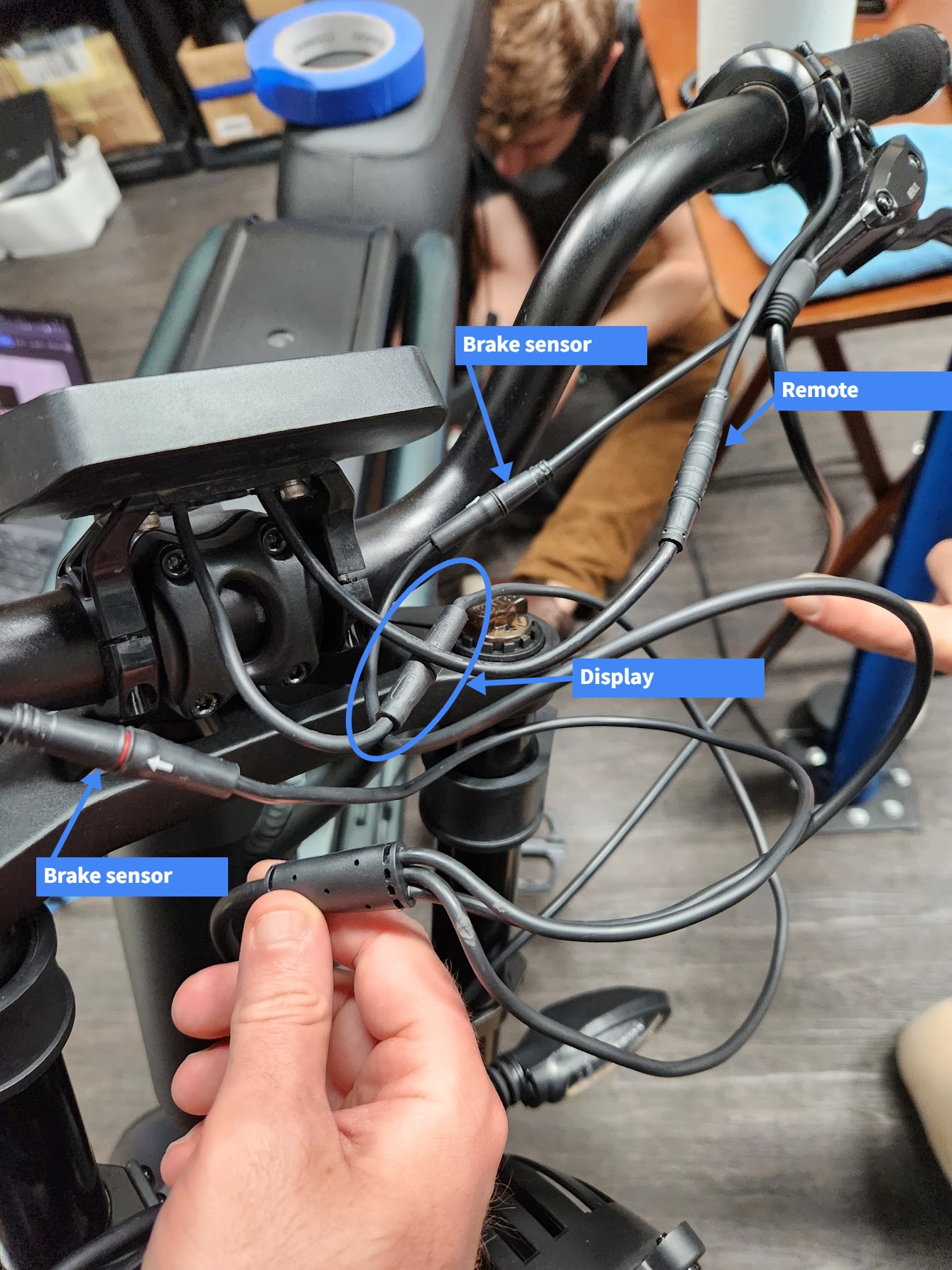
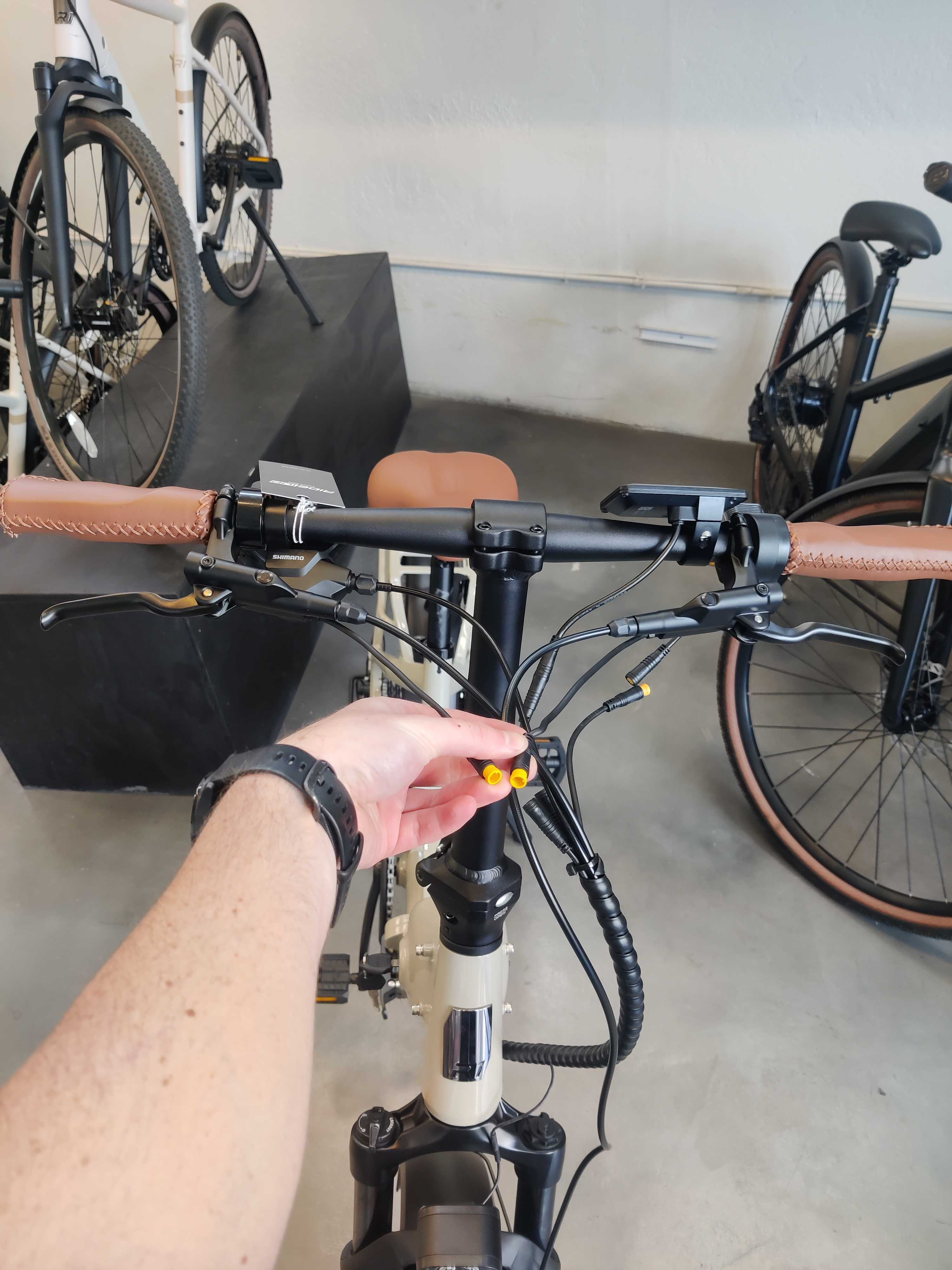
- Undo the spiral cable wrapping and trace the brake sensor wire from the brake lever to the sensor connector. This connector could be close to the handlebars, close to the frame, or even just inside the frame as shown in there reference photos below.
- Disconnect both brake sensors at the connector. On all models, the connector will be red when disconnected except for the Portola which will be yellow.
- Leave both sensors disconnected and test the bike for functionality. If the issue goes away, you know the sensors were causing the issue.
- Reconnect the right lever connector and test the bike again. If the issue comes back, you will know the right side lever needs to be looked at closer. If instead the issue persists, the brake sensors are not the source of the issue.
- Disconnect the right side lever and reconnect the left lever. Test the bike for functionality. If the issue comes back, you will know the left lever needs to be looked at closer.
Pro Tip: As a quick fix the sensors can be left unplugged so you can make it home with assist.
Vorsa sensor connection
The connections are located just inside the frame under the rubber grommet where the wires enter the frame. This grommet will simply pull out of the frame.
Revv1 sensor connection
Portola sensor connection
700 Series and Cafe Cruiser sensor connection
The connections are located just inside the frame under the rubber grommets where the wires enter the frame. These grommets will simply pull out of the frame.

Turris sensor connection

Rift sensor connection

Adjusting the sensor
After determining exactly which brake sensors are causing you issues we can move on to adjusting the sensor. There are 3 screws involved in the adjustment process shown below:

- The set screw that holds the screw labeled 2 in place to prevent it from backing out over time. It is rather small, if removed do not lose it.
- The position adjuster for the sensor - be careful if removed as there is a small spring inside on some models that can become lost.
- The reach adjustment of the lever, which also plays a role.
The sensor can be adjusted by following the steps below:
- Adjust bolt #3 until 1-2 threads are showing.
- Loosen the set screw #1 so that the sensor position adjuster, #2, can turn.
- Turn bolt #2 half a turn counterclockwise.
- Reconnect the problem brake sensor and see if the issue is still present. If the issue resolves.
- Turn bolt #2 another half a turn counterclockwise and test again. Repeat until the issue resolves.
- Take the bike on a quick test ride to ensure the power to the motor cuts out when the lever is pulled. If the power does not cut out, adjust bolt #2 a quarter of a turn clockwise and test again.
- Tighten screw #1 to lock the sensor position adjuster in place.
We hope that this helped to get your bike back on the road again. If you are still having issues with the bike, feel free to reach out to our knowledgeable customer support team with photos and videos showing the issue and the steps you have already taken to try to resolve the issue for further assistance.


